
Updated 16 October 2026.
A landscaping website should show what you do, where you work and how someone can request a quote or site visit. Homeowners need to distinguish regular maintenance from a planting project or larger redesign, then find the right way to contact you.
Website templates for landscapers should keep those practical details close to photographs of the work. Local Business is our main pick for a compact service site. Plumb Line, the catalogue’s other home-services theme, offers individual service pages and an optional price guide.
What a landscaper website needs
- A defined service area. Name the towns or neighborhoods you cover and explain any limits on travel or the kinds of work you accept.
- Accurate hours. Show when people can reach you and explain how quickly you normally respond to inquiries.
- Clear service descriptions. Separate maintenance, planting, design and other work you actually offer. Explain what is included and when a site assessment is needed.
- Quotes and site visits. Provide a clear contact route and describe the information needed to arrange a visit. Explain any visit fee before someone books.
- Consistent local search details. Keep your business name, address, phone number and hours consistent across the website, its search data and your public listings.
- Relevant project photographs. Show your own completed work with captions that explain the service and setting.
A useful service page helps someone recognize whether their job fits your business. Describe the scope in ordinary language and make price conditions clear. If costs depend on access, area or materials, explain that before inviting the quote request.
Website template picks for landscapers
Local Business
Local Business places the phone number in the header and provides a Call button on phones. Its opening visit card shows contact details, hours and an address. Below are a wide photograph, services, an About section with credentials, recent work and a contact band.
The Services and prices page presents the first service as a feature panel, with the remaining services in a priced list and questions below. Price and length fields accept text and can be hidden when they do not apply. The separate Recent work page displays your photographs and captions, while the main button can call your business or link to a booking page.
The theme also checks that configured contact details agree with its business search data. Keep both updated whenever your phone number, address or hours change.

Local Business costs $47 USD one time. Explore the live demo.
Plumb Line
Plumb Line provides a wide photographic home page, numbered service rows, individual service pages, a service-area page and a quote-request page. Adapt its home-services wording to landscaping and replace the sample credentials, prices and towns.
Each service can include typical jobs, planning prices, inclusions and questions. The optional price-guide switch hides those tables while leaving service descriptions complete. Town entries appear together on the service-area page. By default, the quote form opens an email draft that the visitor must send; a configured form service can receive submissions instead. A request does not confirm an appointment.

Plumb Line costs $47 USD one time. Explore the live demo.
Why Astro and EmDash
Astro lets these themes publish plain pages with limited browser scripting. Their Markdown editions resize local photographs during the build, supporting fast loading when customers are browsing on a phone. Clear page titles, service information and an indexable sitemap support search visibility. Local rankings still depend on factors beyond the theme.
The default content lives in plain Markdown and configuration files. There is no site database to attack in this edition, and the standard service pages work without plugin sprawl. You still need to maintain dependencies, hosting access and any form or booking service.
Optional EmDash adds a visual CMS dashboard. Local Business supports page and news editing there, while its services, photographs, hours and contact details remain in configuration. Plumb Line also moves service descriptions, price-guide rows and service areas into the CMS.
You own your content and retain the site files under the theme license, with no monthly builder subscription. Cloudflare offers free allowances that can keep hosting costs low; EmDash must fit the relevant runtime and storage limits, and registry plugins require a paid plan. Any Node host meeting the documented requirements is another option. Review the hosting guide and budget separately for your domain and connected services.
You don’t have to set it up yourself
Claude Code or OpenAI Codex can follow README, GETTING-STARTED and EMDASH to install the theme, enter your business details, enable EmDash and deploy to Cloudflare or a Node host. Supply your actual services, service area, hours and photographs. Review the result before it goes live, and confirm that calls, booking links and test quote requests reach the right place.
Set up Local Business using README, GETTING-STARTED and EMDASH. Add my services, work photographs, service area and hours. Keep visible contact details consistent with business search data. Enable EmDash and prepare a hosted preview for review.The Astro Pass costs $99 USD one time for all 40 Astro themes, unlimited personal, commercial and client sites, and six months of email support.
 Local BusinessLocal business sites with hours and services
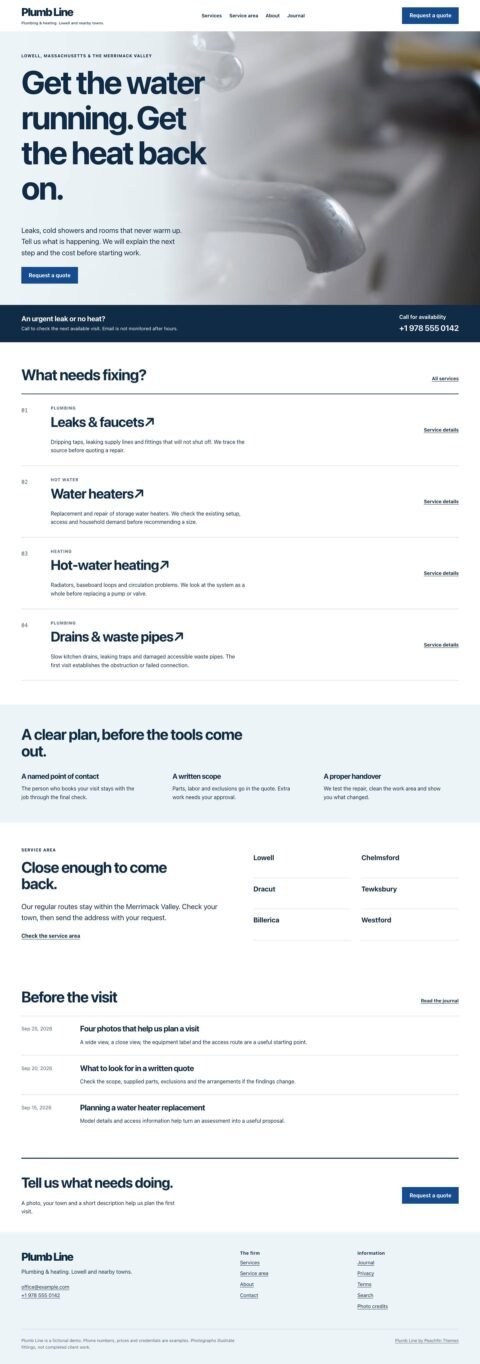 Plumb LineLocal service sites with service areas
Frequently asked questions
Which template suits a landscaping business?
Local Business suits a business that needs prominent phone details, service prices and recent-work photographs. Plumb Line suits a larger service list with individual descriptions and optional planning-price tables.
Does a quote request book a site visit?
No. A request starts a conversation. Local Business can link to a booking page, while Plumb Line supports a separately configured booking link; appointments depend on your booking process.
Can I edit landscaping services in EmDash?
Plumb Line supports EmDash editing of service descriptions, price-guide rows and service areas. Local Business keeps services, rates, hours and contact details in its configuration file.
Choose Local Business to give customers a clear view of your services, completed work and the next step toward a site visit.
Peachfin is not affiliated with Astro, EmDash, Cloudflare, Anthropic or OpenAI.